Reimburse staff in days, not weeks.
MyExpensePal checks every claim against your policy before it reaches finance, so your team only reviews the exceptions.
Tom Bracewell submitted an expense claim for your approval.
- Category
- Client entertainment
- Amount
- £87.50
- Purpose
- Lunch with Halloran Fabrications
- Policy check
- Within limit
- Receipt
- receipt-4471.jpg
Every action is logged and timestamped. Tom is notified automatically.
0%
less time processing each claim
0 days
average time to reimbursement
Zero
chasing emails between finance and staff
Every manual expense claim costs more time than it should.
For a 50-person team with four claims each per month, that is hundreds of hours lost every year to admin.
From claim to reimbursement, without the friction
MyExpensePal handles the checks automatically, so fewer emails are needed and everyone gets paid faster.
Submit
Employees claim in minutes, not half an hour
A guided, structured form means no guesswork and no missing fields.
- Step-by-step guided submission
- Mandatory fields enforced upfront
- Receipts attached at point of claim
- Policy limits shown in real time
Claims arrive complete. No chasing, no corrections.
Check
Policy is applied before finance ever sees it
Every claim is validated against your policy the moment it is submitted.
Compliant, auto-approvedNeeds review, flaggedOut of policy, returned- Your own limits and categories
- Reason returned with every rejection
- Duplicate and missing-receipt detection
- Exceptions routed to the right reviewer
Finance only sees the claims that need human judgement.
Approve
Managers decide from their inbox
The approval email carries the full claim summary, so there is nothing to open and nothing to log into.
- Manager notified instantly
- Receipt visible without signing in
- One click to approve or send back
- Employee notified of the outcome
Most approvals happen within hours, not days.
Reimburse
Paid quickly, with the audit trail already written
Every step is logged and timestamped as it happens, not reconstructed at year end.
- Original receipt stored securely
- Policy checks recorded
- Approval decision timestamped
- Export ready for your accounting system
Staff are paid faster and the evidence is ready if auditors ask.
This is the actual product
No mockups. Every claim arrives already coded to your chart of accounts, with receipts attached and VAT split out.
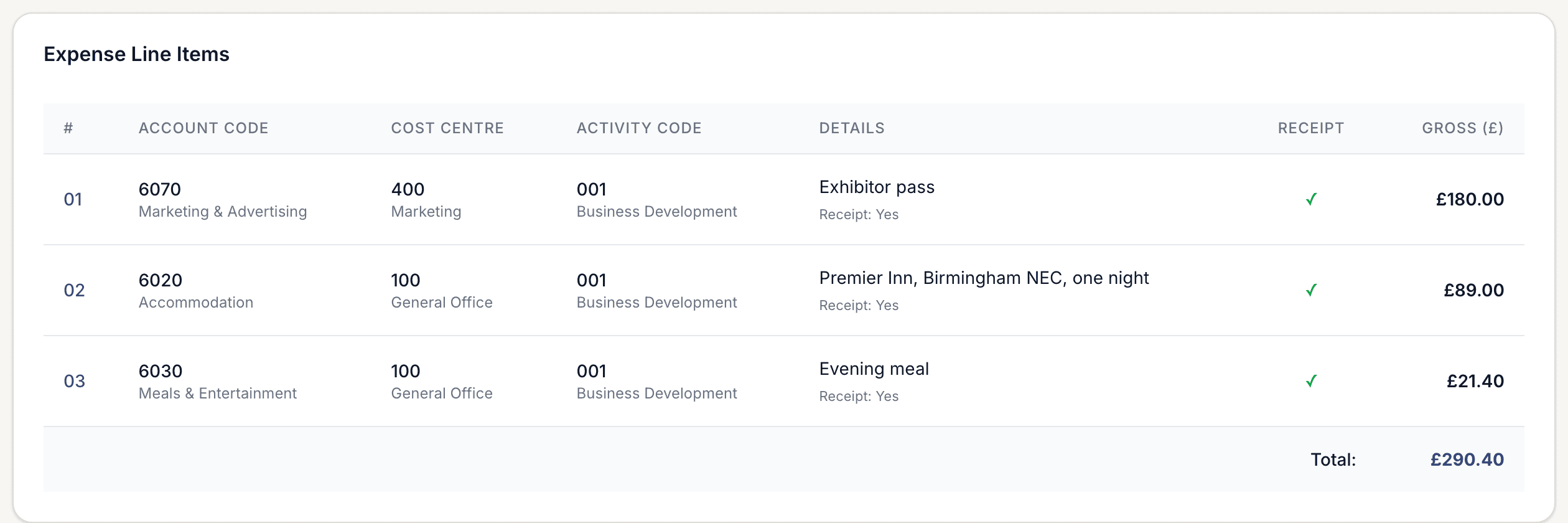
Coded at source
Account, cost centre and activity on every line, straight from your own combinations.
VAT split out
Net and VAT separated automatically, so the journal posts without rework.
Receipt attached
Each receipt is held against the line it belongs to, not the claim as a whole.
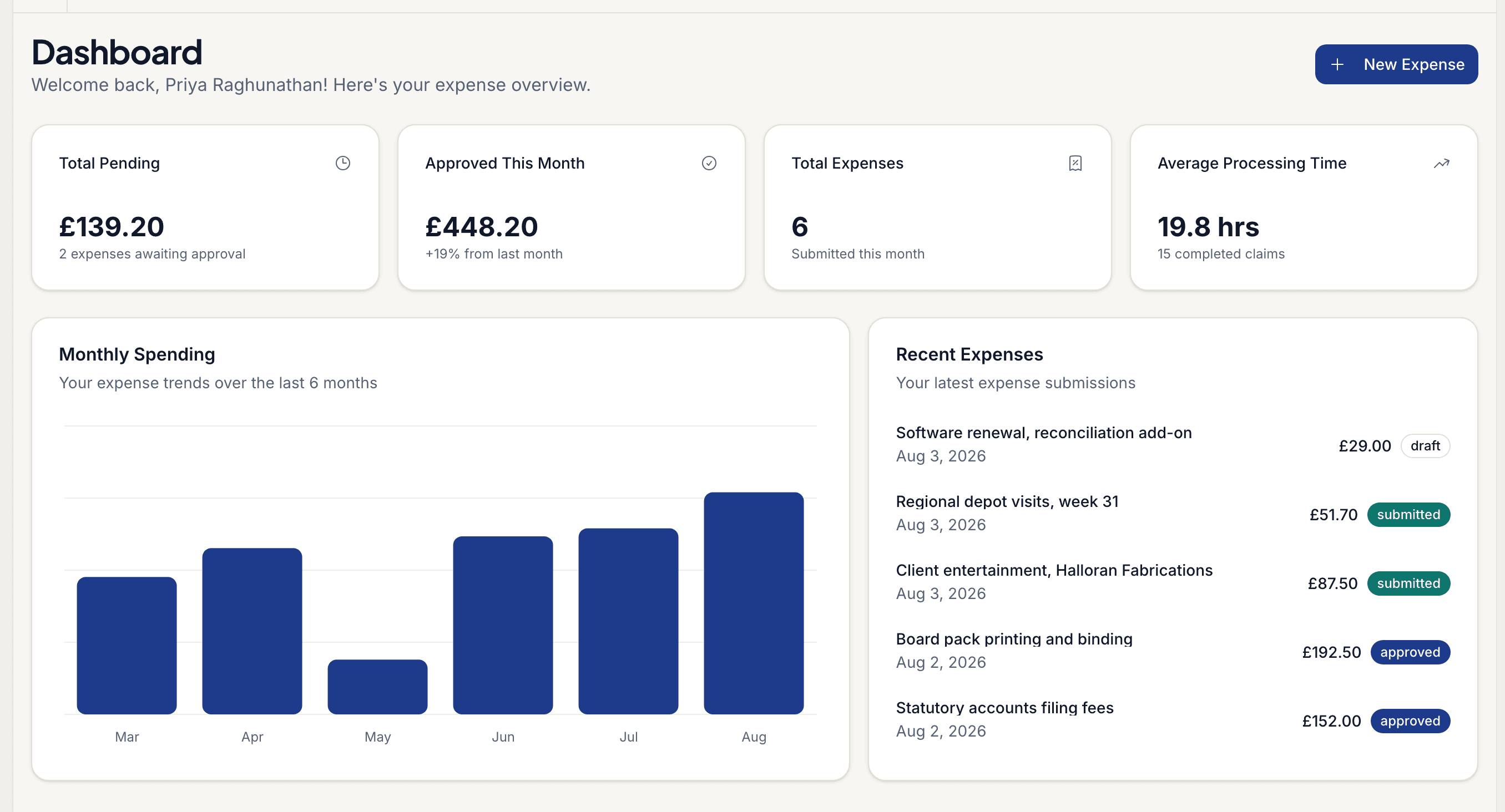
Know where you stand, daily
Pending liability, approved spend, monthly trend and average time to settle, all without exporting anything. Finance sees the position before month-end, not three weeks after it.
Upload your expense policy once. It answers questions and enforces itself.
MyExpensePal reads your own handbook and turns it into two things: an assistant staff can ask before they spend, and a check that runs on every claim before finance sees it.
Ask the policy
Staff get the answer before they spend, not after
Your handbook is indexed and searchable in plain language. Employees ask what they can book, and the assistant answers from your policy with the clause it came from — so finance is not the helpdesk for the same six questions.
- Upload your handbook as a PDF or Word document
- Answers cite the clause and document they came from
- Conversations are saved, so nobody asks finance twice
- Common questions show you where the policy needs rewriting
I'm staying in London on Thursday for the client review. What can I book?
Up to £220 per night including VAT, excluding breakfast, for a business overnight stay. Outside London the limit is £150. Anything above that needs written approval before you book.
Expense Policy 2026 — 4.2 Accommodation
And if I take the client for dinner afterwards?
Client entertainment is claimable with the names and company of everyone attending. Tips are covered up to 10% in the UK where they are not already included on the bill.
Expense Policy 2026 — 6.1 Entertainment
The conversation is saved, so finance can see what staff are asking and where the policy is unclear.
Validate the claim
Every claim is checked against the policy it has to meet
The same document becomes a set of rules with limits, categories and conditions. Each line is validated against them, and anything outside policy is flagged with the clause it breaks and what to do about it.
- Rules extracted from your document, not a generic template
- Every line checked against limits, categories and conditions
- Breaches explained in plain English before submission
- The rule applied and the reasoning stored with the claim
Hotel, London — £268.00
Out of policyAccommodation, London: up to £220 per night incl. VAT
£48.00 over the nightly limit. Written approval required before booking.
Client gift — £65.17
Needs reviewGifts to clients: up to £50 per recipient per year
Over the general limit and needs director approval.
Rail, Leeds to London — £84.20
CompliantStandard class rail booked more than 7 days ahead
Within policy. No action needed.
Checked at submission, with the rule and the reasoning stored against the claim.
Out-of-policy spend is caught at submission, when it can still be corrected — not at month end, when it is already money out the door.
See how much time and money you could save
Adjust the sliders to match your organisation and get an instant estimate.
58
across 100 claims
£2,013
£24,150 per year
7 days faster
£24,150
in reclaimed staff time
Based on your inputs, MyExpensePal could:
- Save your team 58 hours every month
- Cut finance review time by up to 70%
- Reimburse employees 7 days faster
- Return £24,150 per year in productive time
Estimates based on industry benchmarks. Your results may vary.
Better outcomes for everyone
When the process works, the whole chain benefits, not just the person who bought the software.
For finance
Review exceptions, not every claim.
- Clean, consistent data
- Policy enforced at source
- Audit trail built automatically
- Faster month-end close
- Export straight to your ledger
- Spend visible before it is committed
Finance stops being the bottleneck and starts being the control.
For employees
Submit once, get paid fast.
- Submit in under five minutes
- Know policy limits upfront
- Track claim status in real time
For managers
Approve in seconds, not sessions.
- One-click email approvals
- Full claim context in one view
- No chasing or re-checking
Compliant records without extra effort
Speeding the process up does not mean cutting corners. Every claim is documented as it moves, so when auditors ask why, you already have the answer.
Transparent pricing that pays for itself
Most teams recoup the subscription cost in the first month of time savings alone.
- Per active claimant, so you pay for what you use
- 14-day free trial, no credit card required
- No setup consultants or long onboarding
- Cancel anytime
Stop losing hours to manual expense admin.
See MyExpensePal running against your own policy, with your own claim volumes.